REVIEW · ICELAND
Iceland: Audioguide, Interactive map 200 spots ++
Book on GetYourGuide →Operated by My Secret Map · Bookable on GetYourGuide
Iceland feels bigger when it speaks. This Iceland audioguide turns your phone into a guided tour, with a real-time geolocation map and story-driven stops across the country. It’s interesting because you’re not just collecting sights—you’re collecting context.
What I like most is the combination of practical navigation and long-form audio. I love the setup that includes 200++ spots plus 5+ hours of audio, and I especially like that you also get full text transcripts for quick rewinds and offline-friendly reading plans.
The main drawback is also the most important one: you need continuous internet. If your signal drops, the map, itinerary guidance, and media downloads can become a problem.
In This Review
- Key highlights you’ll actually feel on the road
- A guide you can use for a full year
- Price and value for small groups (not just solo touring)
- The real power: geolocation map + itinerary routing
- What the 200++ stops feel like in real use
- How to plan your day using the app (without a fixed itinerary)
- Audio + transcripts: when you want audio, and when you want facts
- Photo stops that help you plan, not just hope
- Languages: English, Français, Deutsch (and what that means)
- Logistics that matter: internet, charging, headphones/car audio
- Internet access is essential
- Battery life is your real travel enemy
- Headphones or car audio
- What happens when something goes wrong
- Who this audioguide suits best
- Quick “should I book?” decision checklist
- FAQ
- How much does the audioguide cost?
- How long can I use it?
- Where do I meet for the experience?
- What languages are included?
- Do I need internet to use the app?
- What does the guide include besides audio?
- How much audio content is there?
- Do I need headphones?
- Is it wheelchair accessible?
- Can I cancel for a refund?
Key highlights you’ll actually feel on the road
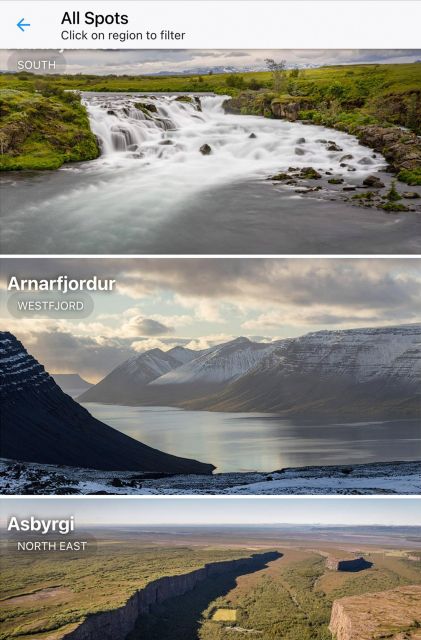
- 200++ spots across Iceland: famous places plus lesser-known stops with explanations, not just captions
- 5+ hours of audio (English, Français, Deutsch): sagas, geology, geyser science, Northern Lights themes, and more
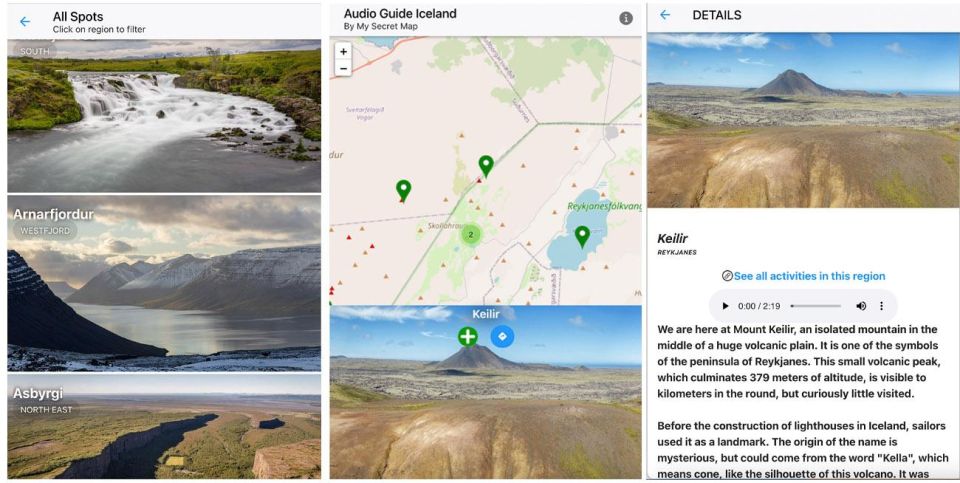
- Interactive map with geolocation: you can get your bearings fast and plan the next hop
- Route guidance options: you choose a scenic-style connection or a quicker connection between spots
- Text transcripts included: read along, skim later, and refresh memories without replaying audio
- Photo recommendations pinned in the app: help for timing and vantage points when you want the shot, not luck
A guide you can use for a full year
This isn’t a one-day bus-style tour. It’s a phone-based audioguide with a 365-day duration, so you can match it to your real schedule instead of the other way around. You can start when it’s available for your dates, then keep the app working through your travel window.
That long time window matters in Iceland. Plans shift. Weather changes. You might swap a hike for a museum day, or reverse your driving order because the wind is calmer in one direction. Having an evergreen guide means you’re not stuck with a rigid itinerary.
Also, there’s no meeting point. You can use it everywhere, which is great if you’re already doing your own road trip or using public transport. In practice, you’ll just open the app at the spot you want, hit play, and follow the next suggested stops.
You can also read our reviews of more tours and experiences in Iceland.



Price and value for small groups (not just solo touring)

The price is listed as $17 per group up to 6. That’s the big deal: it can be far cheaper per person than many “per traveler” audio options, especially if you’re traveling with friends or family.
Here’s how it can pencil out:
- If you’re one person, you’re paying the full group price.
- If you split it among 3 to 6 people, it can become a low-cost way to add real context to a road trip.
It’s not a guided tour with a person in the car. But you are buying more than audio—this includes an interactive map, geolocation, itineraries, and transcripts. That combination is what makes it feel like a real planning tool instead of a soundtrack.
The real power: geolocation map + itinerary routing
The app’s interactive map uses real-time geolocation, so you’re not constantly asking your phone where you are. That matters in Iceland because roads, pull-offs, and sight points can look similar—especially in fog or flat light.
You can use it to:
- See where you are while you travel
- Switch between spots without guessing
- Follow itinerary guidance between locations
The listing also mentions that the guide helps you connect different spots with routing options—like choosing a most scenic connection or a quickest one. That’s practical, not fancy. If you’re short on daylight, you’ll want the quicker option. If you have time and patience, the scenic route gives your day a better flow.
One more practical note: since the app needs internet to power the map and itinerary features, you’ll want a charged phone and a plan for power (a power bank helps a lot in Iceland driving days).
What the 200++ stops feel like in real use
You’ll see 200++ unique spots available in the audioguide. The important part isn’t the number—it’s how the content is organized so you can tap into it while you’re standing there.
The audio themes listed are exactly what make Iceland click:
- Icelandic sagas and legends (story layer)
- Geological and cultural tales (why the place looks and feels the way it does)
- Science behind geysers (what’s happening under the surface)
- Northern Lights magic (light, timing, and how to think about it)
- Practical stop enhancements like best photo opportunities
So instead of reading a sign and moving on, you’ll get the “why” while you’re in front of the thing. That makes the experience feel smarter, not just louder.
How to plan your day using the app (without a fixed itinerary)
Because you’re dealing with 200+ stops, you’ll want a strategy. I’d use the app like this:
- Pick your “must-do” area for the day (often one driving region)
- Choose 2–4 stops that match your energy
- Use the itinerary guidance to connect them
- Keep one flexible slot for weather or sudden photo chances
You can also think of stops in categories, since the app covers major Iceland topics:
- Story stops: quick legends and saga context that make a location feel human
- Water-and-ice stops: waterfalls, coasts, and icy-looking scenes with explanations
- Fire-and-steam stops: geysers and volcanic thinking explained in plain language
- Night-light stops: Northern Lights guidance that helps you plan for the right kind of evening
That way, you’re not trying to “do everything.” You’re building a day that makes sense.






Audio + transcripts: when you want audio, and when you want facts
A lot of audioguides are one-way. This one includes full textual transcripts for all audio content. That’s a big advantage if:
- You’re in a windy spot where listening is tough
- You want to pause and read the key points without replaying
- You want to take a few notes while it’s fresh
The guide also promises crisp audio quality and a user-friendly interface. In practice, it’s the mix of audio and text that makes it feel like a companion.
If you’re traveling as a group, transcripts can help with pacing too. One person listens while another reads, then you all compare notes at the next stop.
Photo stops that help you plan, not just hope
The app includes dedicated recommendations for best photo opportunities. Since Iceland is a “light changes every hour” destination, those notes can save you time.
Instead of wandering for 30 minutes trying to find the right angle, you can:
- Check the photo suggestion
- Arrive with some expectation of framing
- Adjust your position while the light lines up
A small detail, but it changes your day. When you’re balancing driving time, short walks, and weather, planning for photos early is usually more efficient.
Languages: English, Français, Deutsch (and what that means)
The audioguide is available in English, French (Français), and German (Deutsch). That’s helpful if you’re traveling with mixed language backgrounds, and it can make audio much more comfortable than switching between languages manually.
There’s also a note that Italian is coming soon. If you’re an Italian speaker, you’ll want to check the current availability when you book.
Logistics that matter: internet, charging, headphones/car audio
This is the section that can make or break the experience.
Internet access is essential
The app’s map, itinerary guidance, and media downloads require continuous internet. If you rely only on patchy cellular coverage, you’ll likely run into moments where the app can’t update properly.
Practical move: plan around this like you plan around Iceland wind. Keep expectations realistic. If you expect dead zones, use time wisely—listen to audio you’ve already accessed, and keep the map check brief while in low-signal areas.
Battery life is your real travel enemy
You need a charged smartphone. The app uses geolocation, which can raise battery drain. Bring a power bank if you’ll be on the move all day, and keep charging near places you can pause safely.
Headphones or car audio
For the best audio experience, headphones or car audio connectivity is advised. That’s not just comfort. In Iceland, wind and road noise can make audio hard to hear unless you’re using a direct audio setup.
What happens when something goes wrong
One of the most reassuring details is support responsiveness. In at least one reported case, the provider (My Secret Map) handled a situation where a user couldn’t use the guide due to an error and issued a new access right away.
You won’t control every tech hiccup on the road—phones freeze, updates happen, emails land late. But it’s good to know the provider has a pathway to fix access when it fails.
Who this audioguide suits best
This works best if you match one (or more) of these profiles:
- You like driving and choosing your own stops, not following a rigid route
- You want context for Iceland’s sagas and geology, not just photo ops
- You’re traveling with 2–6 people and want group pricing
- You prefer flexible pacing: audio now, reading later, repeat when you care
- You appreciate an app that helps you connect points with routing options
It’s less ideal if you:
- Don’t want to rely on continuous internet
- Hate using your phone while moving around outside
- Expect a fully offline guide with no data needed (this one explicitly requires data)
Quick “should I book?” decision checklist
Book this audioguide if you want a smarter way to explore:
- You’ll use your phone for navigation anyway
- You can keep internet access reliable enough for geolocation and routing
- You like learning as you go, with audio plus transcripts
- Your group can split the $17 per group up to 6 cost
Skip it (or reconsider) if:
- You’re planning long stretches where you’ll have weak or no signal
- You don’t want the dependency on a charged phone and data
- You prefer a traditional guide with no device involvement
FAQ
How much does the audioguide cost?
It’s priced at $17 per group for up to 6 people.
How long can I use it?
The duration is 365 days. You’ll see available starting times when you check availability.
Where do I meet for the experience?
There is no pickup location. You can use the guide everywhere.
What languages are included?
English, Français (French), and German are included. Italian is listed as coming soon.
Do I need internet to use the app?
Yes. Continuous internet access is essential to use the map, itinerary, and download media.
What does the guide include besides audio?
You get an interactive map with real-time geolocation, itinerary guidance to connect spots, best photo opportunity recommendations, and full text transcripts of the audio content.
How much audio content is there?
It includes more than 5 hours of immersive audio content and covers 200++ unique spots.
Do I need headphones?
Headphones or car audio connectivity are advised for the best audio experience.
Is it wheelchair accessible?
Yes, it’s listed as wheelchair accessible.
Can I cancel for a refund?
You can cancel up to 24 hours in advance for a full refund.